

Our broadcast console still works.
That is probably the most important place to start.
We are not moving away from our Yamaha TF5 because it suddenly became a bad console or because our livestream sounds terrible. The problem is simpler than that.
We are beginning to outgrow the architecture.
Our current church audio system is built around Yamaha consoles, Tio stage boxes, Dante, and Waves processing. FOH has its own TF5, monitors are handled from a TF Rack, and broadcast has another TF5 dedicated to the online mix.
That setup has served us well. But as our production has grown, one limitation has become increasingly difficult to ignore:
32 channels.
When the system starts making decisions for you
Thirty-two channels sounds like plenty until you start actually counting.
Drums can consume a large portion of that by themselves. Then add bass, acoustic guitars, electric guitars, keys, tracks, playback, worship leaders, background vocals, speaking microphones, ambience microphones, and anything else the broadcast mix needs to access independently.
Suddenly 32 channels does not feel very large.
The issue is not that we physically cannot make Sunday happen. We can.
The issue is that we are getting closer to making production decisions based on what fits into the console instead of what would create the best broadcast mix.
That is the point where I start asking whether the architecture needs to change.
And it led to a question I probably would not have seriously considered a few years ago:
Does our broadcast mix actually need to live on a traditional console?
Why not just buy a bigger console?
That would certainly be the conventional solution.
We could replace the broadcast TF5 with a console that has more input channels, more buses, more processing, and more room to grow. There is nothing wrong with that approach.
But once we started looking at what we actually needed from the next broadcast system, I realized that channel count was only one part of the conversation.
We also want better recording capability.
We want more flexible routing.
We want a dedicated monitoring workflow for the broadcast engineer.
We want tactile control without being permanently tied to the processing architecture of one physical console.
And eventually, I want us to be able to capture what happens on Sunday at a level that could actually be used for music production afterward.
Once those requirements were on the table, simply buying a larger broadcast console stopped feeling like the only obvious answer.
We already live in a Dante world
One reason this idea makes sense for us is that the rest of our system is already heavily networked.
Our stage inputs are already moving around the building through Dante. Our Yamaha consoles and Tio stage boxes are already part of that network.
So the question became:
What if the broadcast system simply received those Dante channels directly into a computer?
That is where Pro Tools entered the conversation.
And importantly, this does not mean throwing away the software processing environment we already use. Our current broadcast Waves computer will become the Pro Tools broadcast machine, and the Waves plugins we already rely on can be integrated directly into the Pro Tools session.
So rather than maintaining a separate Waves processing workflow beside the broadcast console, the goal is to bring the mixing, processing, routing, and recording environment together inside Pro Tools.
Here’s what that architecture is designed to look like:
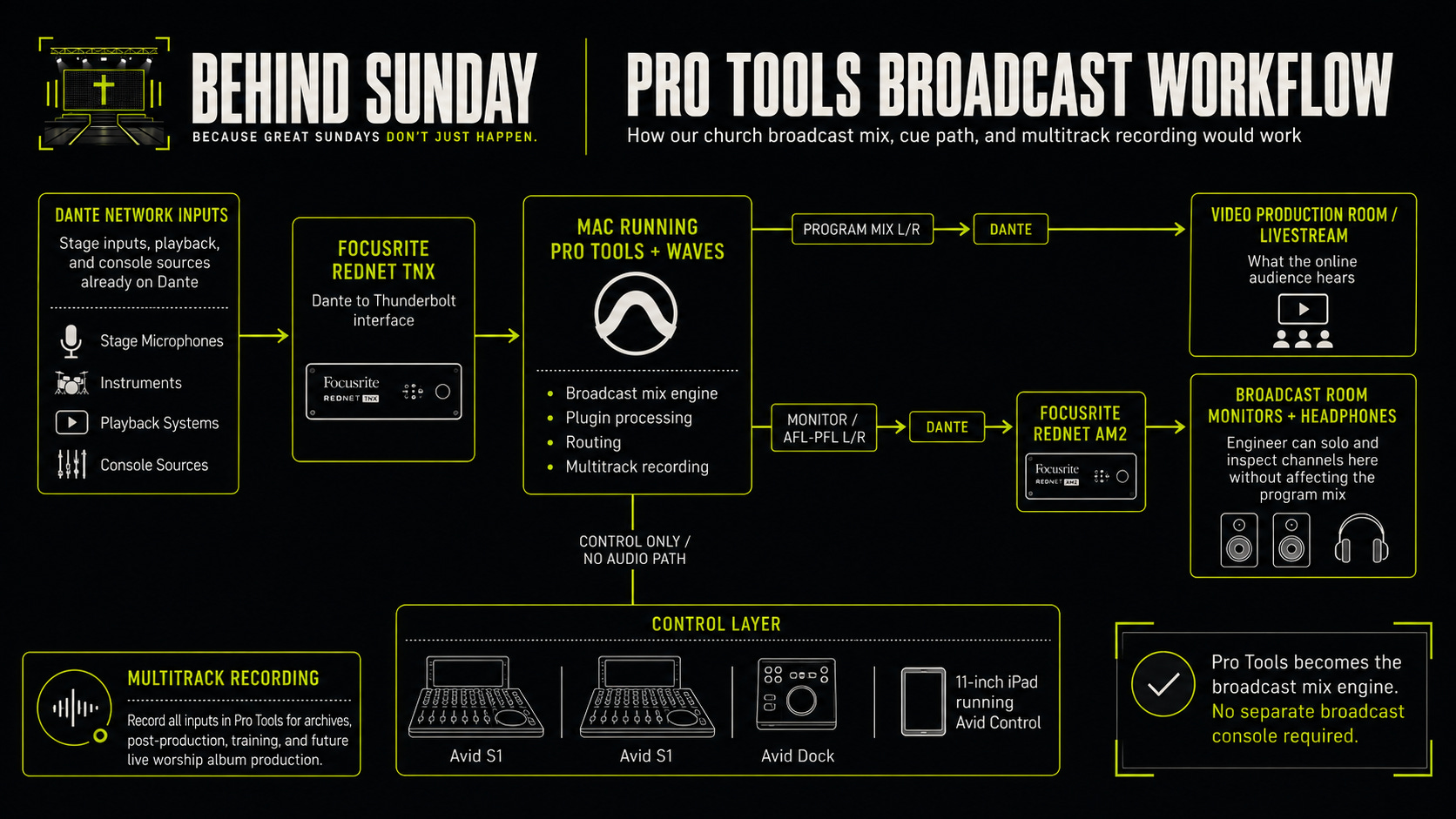
The diagram also shows an important distinction in the new system: the Avid surfaces are the control layer, not the audio engine. Pro Tools is doing the mixing and processing while the S1s, Dock, and iPad give the engineer a tactile interface.
But I still want faders
I have no desire to mix an entire Sunday service with a mouse.
Yes, technically it can be done. That does not mean I want to do it.
Live mixing is tactile. I want to be able to grab a vocal immediately. I want multiple faders under my hands. I want channel selection, banking, transport control, and the ability to interact with the mix without constantly hunting around a computer screen.
That is why the control and monitoring side of the proposed system includes:
2 Avid S1 control surfaces
Avid Pro Tools Dock
1 Apple 11-inch iPad
Focusrite RedNet AM2
The S1s and Dock do not become the audio engine.
Pro Tools remains the engine.
The iPad becomes part of the Avid control environment, while the physical surfaces give the engineer tactile access to the mix.
That distinction is one of the things I find most interesting about this whole approach.
We are separating what processes the audio from what the engineer physically mixes on.
Broadcast also needs a real control room
One requirement I did not want to compromise on was monitoring.
Our broadcast engineer needs to hear the same complete mix the online audience is hearing. But the engineer also needs the ability to inspect individual sources without affecting that audience.
If the lead vocal sounds strange, I may want to listen to only that microphone.
If something is happening with an acoustic guitar, I want to hear it by itself.
If I need to inspect an ambience microphone, I should be able to do that without suddenly sending a soloed ambience mic to everyone watching online.
So the architecture is being designed around two separate stereo destinations.
Program path
The complete livestream mix leaves Pro Tools over Dante and goes to the video production system.
That is what the audience hears.
Monitor path
A separate stereo output goes to the RedNet AM2 in the broadcast room.
That feeds the engineer’s studio monitors and headphones.
Under normal circumstances, the engineer hears the complete broadcast mix. When something needs to be inspected, the monitoring workflow can change what the engineer hears without changing the actual program feed.
That may sound like a small feature.
When you are actually mixing live broadcast, it is not.
The immediate goal is more freedom in broadcast
All of this started because we want a broadcast system that is no longer boxed into the same 32-channel limitation.
Moving into Pro Tools gives us a much larger environment for routing and mixing. We can build the session around what the broadcast actually needs instead of constantly asking which channels will fit.
But the more we have designed this system, the more I have realized that solving the broadcast problem could unlock something much bigger.
Sunday becomes recordable
This may be the part of the project I am most excited about.
For the first time, we are building a system where the same channels coming into the broadcast mix can also be captured as individual multitrack recordings.
Not just the stereo livestream.
The actual sources.
Drums.
Bass.
Acoustic guitar.
Electric guitars.
Keys.
Tracks.
Lead vocals.
Background vocals.
Speaking microphones.
Room microphones.
Potentially everything we decide is worth capturing.
That fundamentally changes what happens after Sunday.
Until now, the service has mostly been something we mix in real time. Once it is over, we have the finished livestream recording.
That recording is useful, but it is not the same thing as having the individual performances available afterward.
With multitrack recording, Sunday does not have to disappear once the service ends.
A live worship project becomes possible
There have been Sundays where something happens during worship and you immediately think:
I wish we had actually captured that.
Not simply the livestream.
The performance.
The lead vocal.
The harmonies.
The drums.
The band.
The room.
The congregation singing.
The kind of recording you could take back afterward and actually work with.
We have never really had the infrastructure to do that properly.
That is what this new system could change.
If we capture those individual tracks, we can bring them back into a post-production environment later and build an entirely different mix specifically for music.
We could rebalance instruments, work on the vocals, process the drums differently, shape the room microphones, edit where appropriate, and create a final mix that is not limited by whatever decisions had to be made during the live broadcast.
For the first time, producing a legitimate live worship release becomes a realistic possibility for us.
That was not the original reason we started redesigning the broadcast system.
But it may eventually become one of the most valuable things the redesign gives us.
Livestream and music production are two different mixes
This distinction matters.
The mix I want for someone watching church live on Sunday is not necessarily the mix I would create for a worship album.
During the livestream, the broadcast engineer is responding to what is happening in real time. The mix has to support the service as it unfolds.
There are host moments.
There is preaching.
There are transitions.
There are unexpected changes.
There is no opportunity to stop and say, “Let’s do that chorus again.”
A music release is different.
Once we have the multitracks, we can make decisions specifically around the music.
That is why simply recording the final livestream output has never really given us the same opportunity.
The stereo livestream captures the event.
The multitracks preserve the ingredients.
That is a completely different level of flexibility.
Then there is virtual soundcheck
Multitrack recording opens another door that has nothing to do with releasing music.
Training.
Once we have a full Sunday recorded, we potentially have material that can be used to develop the broadcast mix when the band is not physically on stage.
Instead of asking musicians to stand around while an engineer experiments with compression, EQ, Waves plugins, routing, or balance, we can work with previously recorded material.
That could become incredibly useful for training volunteers.
A developing engineer can practice mixing a real worship set without the pressure of an actual service happening.
We can experiment with Pro Tools templates.
We can test processing.
We can refine the workflow.
We can compare different approaches.
We can train someone on a Tuesday using the exact same inputs they may eventually be responsible for mixing on Sunday.
One Sunday service can continue teaching us long after Sunday is over.
The upgrade starts solving more than one problem
This is where the project became much easier for me to evaluate.
If the only benefit were:
We can go beyond 32 broadcast channels.
then we would compare the cost of this system directly against the cost of a larger console.
But that is no longer the whole picture.
The architecture we are building potentially gives us:
More broadcast input capacity
Much greater routing flexibility
Direct integration of our existing Waves plugins
Dedicated broadcast monitoring
Tactile hardware control
Multitrack recording
Post-production capability
Virtual soundcheck
Better volunteer training material
Archival recordings
The foundation for future live worship releases
Now we are not simply replacing a console.
We are building a broadcast and recording environment.
That is a much more interesting investment.
What does the system cost?
For the portion of the upgrade we still need to purchase as part of the current proposal, the budget looks like this:
ItemCost2 Avid S1 Control Surfaces$2,590.00Avid Pro Tools Dock$889.00Focusrite RedNet AM2$559.00Pro Tools Studio Annual Subscription$299.00Apple 11-inch iPad$399.99Current proposal total$4,736.99
There are two major pieces I am intentionally keeping outside that number.
The Mac
We are not purchasing another computer specifically for this proposal.
Our existing Waves computer will be repurposed as the Pro Tools broadcast machine.
That means the computing power we already invested in continues to serve the broadcast system, just in a different role.
Focusrite RedNet TNX
The RedNet TNX is also being handled separately from this particular proposal.
That becomes the bridge between our Dante network and the Mac over Thunderbolt, allowing Pro Tools to receive the channels already moving through our existing Dante infrastructure.
And because we already have a Waves plugin ecosystem, we are not abandoning that processing either.
Instead of Waves living in a separate processing path around the console, the plugins can become part of the Pro Tools session itself.
That means the new architecture is less about replacing everything we already own and more about reorganizing the pieces we already have around a different mixing engine.
I think showing those numbers matters.
“Moving broadcast into Pro Tools” can sound like an expensive science project until you separate what actually needs to be purchased from the infrastructure you already own.
For us, the current additional investment in this proposal is $4,736.99, while the Mac, Dante infrastructure, RedNet TNX, and Waves ecosystem are being handled separately or repurposed from equipment already in the system.
And that investment is not only increasing our broadcast capacity.
It is giving us the control environment, monitoring, recording capability, and software foundation that we hope will carry us into multitrack recording and eventually live worship production.
There are tradeoffs
I also do not want to pretend that moving broadcast into Pro Tools is automatically better than using a console.
It is more complicated.
We become increasingly dependent on the computer.
Dante becomes even more mission critical.
The interface becomes mission critical.
The Pro Tools session becomes mission critical.
The control surfaces and monitoring environment need to be designed correctly.
And volunteers who understand a Yamaha TF5 will not automatically understand this workflow.
There is also the larger question of failure.
If a traditional console has a problem, most experienced church production people have a pretty good understanding of where to start troubleshooting.
A software-based broadcast system introduces more layers:
Computer.
Operating system.
Pro Tools.
RedNet TNX.
Dante.
Network.
Control surfaces.
Waves plugins.
Routing.
That complexity has to be respected.
A system is not better simply because it is more powerful.
It is better only if we can operate it reliably.
Would I recommend every church do this?
Absolutely not.
If a church has 24 inputs and a console that handles everything comfortably, I would not tell them to replace a stable broadcast workflow with Pro Tools because software mixing sounds more interesting.
That would be solving a problem they do not have.
And if another console is the simplest, most reliable way to accomplish what your church needs, then buy the console.
The point of this project is not:
Pro Tools is better than consoles.
The point is:
Our requirements changed, so we are questioning whether the architecture that got us here is still the best architecture for where we want to go next.
That is a very different conversation.
Good upgrades should solve today’s problem without closing tomorrow’s doors
That may be my biggest takeaway from this project so far.
We started with a limitation:
Our broadcast mix is running into a 32-channel ceiling.
The easy response would have been to buy another console with more channels.
Instead, that limitation forced us to step back and ask what else we wish the system could do.
Record everything.
Train engineers differently.
Improve post production.
Build a better broadcast control room.
Capture worship.
Potentially produce music.
Once those goals entered the conversation, the solution started looking different.
That does not automatically mean this will be the perfect system.
We have not lived with it yet.
There will almost certainly be things we learn once it is actually running every Sunday.
And when that happens, I plan to share those too.
Because the goal here is not to show off the finished rack.
It is to show the work.
So, does a church broadcast mix still need a console?
Maybe.
Maybe not.
I think the better question is:
What does your broadcast system actually need to accomplish?
For us, the answer is becoming bigger than a live stereo mix.
We want to mix Sunday.
We want to record Sunday.
We want to train from Sunday.
And someday, we want the ability to take what happens during worship on Sunday and turn it into something people can keep listening to long after the service is over.
If one system can help us do all of that, then moving the broadcast mix out of a traditional console starts making a lot more sense.
And that is exactly what we are about to find out.
I know there are churches already mixing broadcast completely inside Pro Tools, Logic, Reaper, Ableton, and other DAWs, while others would never consider giving up a dedicated console.
I’d love to hear both sides.
Are you mixing your church broadcast on a traditional console, inside a DAW, or using some combination of the two?
And if you made the move to software, what did you learn that you wish you knew beforehand?
Carlos Sanchez
Behind Sunday
Behind the work. Elevating the mission.