


For a while, we had been chasing a wireless problem at church that never seemed completely predictable. Every now and then, one of our musicians or vocalists would lose audio in their in-ear monitors. Sometimes it would only be for a moment, and other times it was enough to make somebody wonder whether their pack, earbuds, transmitter, or something else in the signal chain was failing.
At the same time, we were also dealing with interference on one of our wireless acoustic guitar systems. Nothing is more fun during a Sunday morning than troubleshooting a problem that only seems to happen when everyone is actually using the system.
At first, there wasn’t one obvious culprit. But we have a lot of wireless equipment operating in the same building, and nearly all of it is trying to find space in the UHF spectrum. Eventually I started asking a different question: what if the individual wireless systems weren’t really the problem? What if the problem was the RF environment we were putting all of them into?
That sent me down a much deeper rabbit hole than I expected.
We had 27 wireless frequencies in one building
Once I started looking at the entire system instead of one troublesome pack at a time, the scale of the problem became pretty obvious. Between our wireless microphones, in-ear monitor systems, instrument wireless and other gear, we had 27 wireless devices operating in the building.
Until this point, most of those systems had essentially been treated individually. Find a clear frequency, make sure it works, and move on. That can work when you only have a handful of wireless channels, but once you get into a system our size, it gets more complicated.
You’re not only trying to avoid television stations and other outside RF sources. You also have to make sure your own transmitters aren’t too close together, that the frequencies work within the tuning range of each specific device, and that the combination of frequencies isn’t creating intermodulation products that land on top of something else you’re trying to use.
I knew enough about RF coordination to know that calculating all of that manually was not something I wanted to do. That’s when I found SoundBase.
SoundBase changed the way I looked at the problem
SoundBase is designed specifically for RF coordination. Instead of looking at one wireless system at a time, you can build an inventory of everything operating at the venue and then evaluate the RF environment as a whole.
It can identify known television stations based on your location, use RF spectrum scans that have already been collected nearby, and also accept your own spectrum scans so you can see what the RF environment actually looks like inside your venue.
We were fortunate enough to find a scan that had been performed nearby at TBN’s facility in Hendersonville, roughly seven miles from us. That gave us a much better starting point than simply guessing where the clean spectrum should be.
But I really wanted to know what was happening inside our building, and that presented another problem.
I wanted a spectrum analyzer. I did not want the spectrum-analyzer price.
One way to capture the RF environment would have been to purchase a dedicated spectrum analyzer. The RF Venue RF Explorer Pro I was looking at was around $1,599.
I like buying new production toys as much as the next person, but spending $1,599 just to figure out what was happening in our wireless spectrum was a difficult purchase to justify. Then I started thinking about something I had already been experimenting with: software-defined radio.
An SDR is essentially a radio receiver that lets software handle much of the tuning and signal-processing work. If I could make one scan the frequency range we needed and export that information in a format SoundBase could understand, I might be able to accomplish a similar diagnostic task for a fraction of the cost.
I settled on a Nooelec NESDR SMArt v5 HF/VHF/UHF bundle for $54.95.
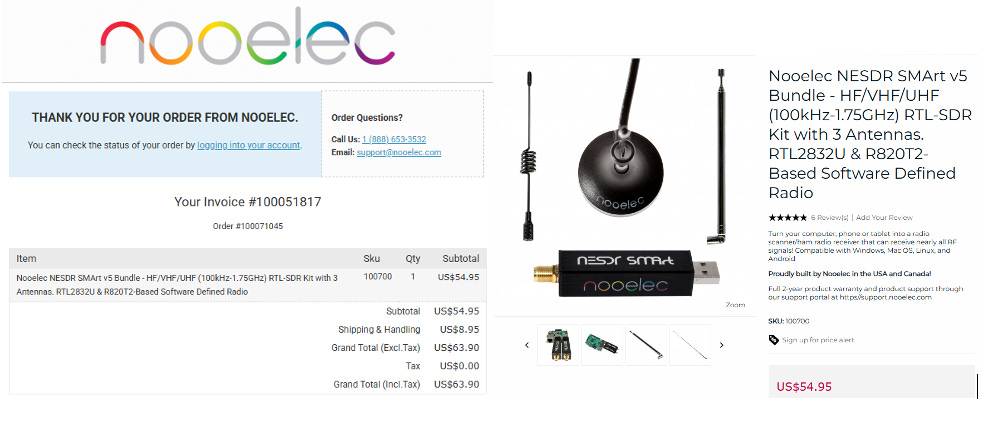
There was definitely some tinkering involved. I used ChatGPT to help work through the utility software and eventually build a one-click process that would scan the section of spectrum we needed and generate a file that could be imported into SoundBase.
There were a few failures along the way, but eventually it worked. For about $55, I now had a way to take an RF spectrum scan inside our own building.
That’s when things started getting interesting.
First, we had to inventory everything
Before SoundBase could tell us what was wrong, we had to tell SoundBase exactly what we had. That meant going through every wireless device and documenting the manufacturer, model, frequency band, current operating frequency, and group or channel settings where applicable.
This was probably the least exciting part of the project, but it may have been the most important. Once all 27 devices were entered accurately, SoundBase could finally evaluate the system as a complete RF environment instead of a collection of unrelated wireless boxes.
Then I ran the health check.
20 of the 27 devices had issues.
That was the moment this stopped feeling like a couple of random wireless dropouts. We had an RF coordination problem.
There wasn’t just one problem
SoundBase identified several different types of issues. One was the RF noise floor, which is essentially the amount of background RF energy already present in the environment. Your wireless system needs enough separation between that noise and the signal you’re actually trying to receive.
The spectrum scans showed areas where that noise floor was something we needed to take seriously. We also had interference involving television broadcast spectrum, which was something I had already suspected as changes were occurring in the TV spectrum around us.
Then there were simple spacing problems. Some of our devices were operating too close together in the spectrum. On top of that, there was intermodulation distortion, which happens when multiple RF signals interact and create additional frequencies that weren’t intentionally transmitted.
With enough wireless devices operating together, those unwanted products can land right where another receiver is trying to listen. That means you can select frequencies that individually look clear and still create a problem once the rest of the system is turned on.
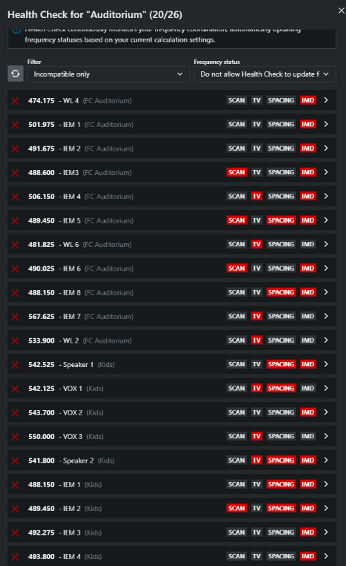
Looking at the system as a whole, it was pretty obvious why chasing individual dropouts hadn’t solved anything. It was a mess.
Then SoundBase rebuilt the frequency plan
This is where the software became incredibly useful. Because SoundBase already knew the tuning ranges and characteristics of the wireless equipment we had entered, it could work through the available spectrum and calculate a set of frequencies designed to coexist.
It was taking into consideration the RF environment, television interference, spacing between devices, intermodulation products and the frequency ranges each piece of equipment could actually use. Instead of me trying to find 27 frequencies that looked clear one at a time, we could coordinate the entire system together.
After working through the new frequency plan, we ran the health check again.
All 27 devices passed.
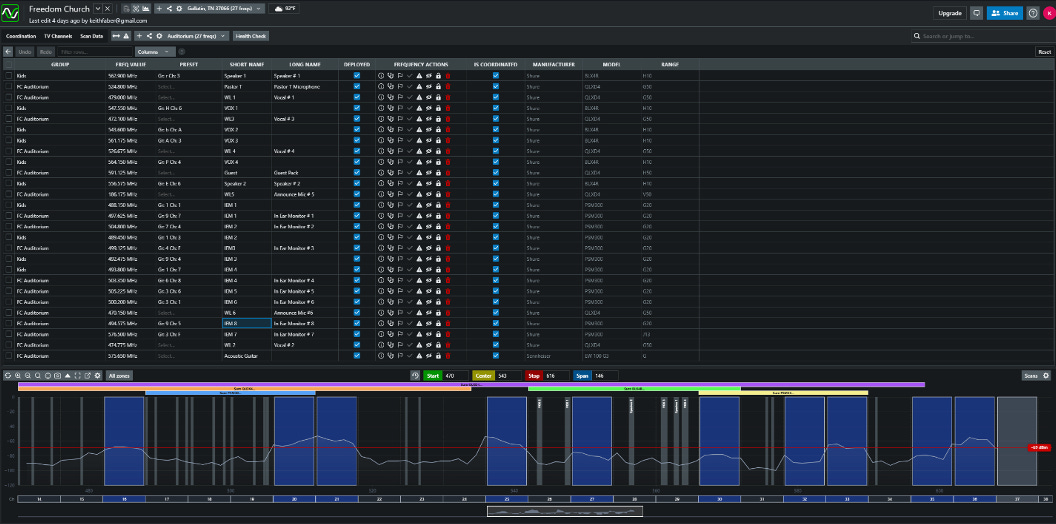
SoundBase also gave us a table showing the frequency each device needed to be programmed to.
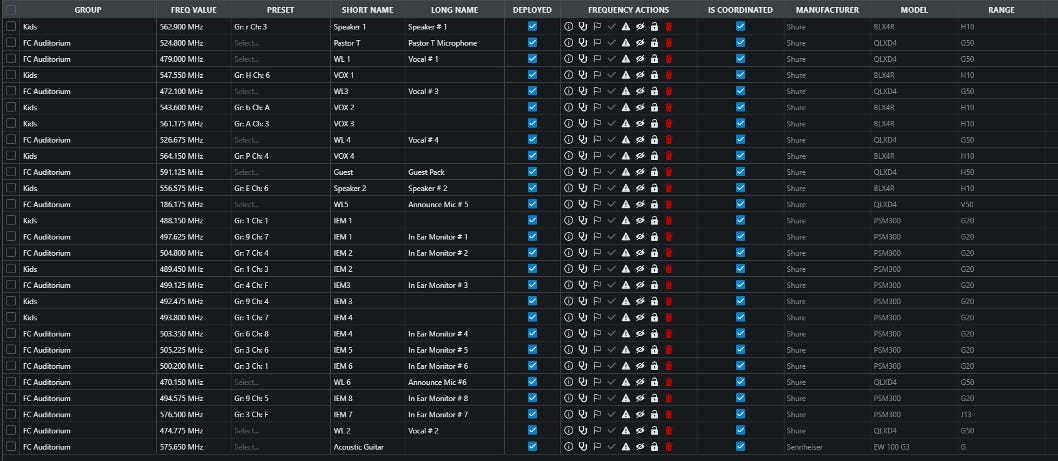
Now we weren’t randomly moving frequencies until the interference disappeared. We had an actual coordinated RF plan.
The biggest thing I learned
The biggest lesson for me wasn’t really about SoundBase or SDRs. It was realizing how easy it is to troubleshoot wireless gear one device at a time when the problem actually exists at the system level.
If an IEM pack drops out, we naturally look at that pack. Is the antenna bad? Is the transmitter failing? Is the receiver too far away? Did somebody change the frequency? Those are all reasonable questions.
But once you have a building full of wireless microphones, instrument packs and in-ear monitor transmitters, every transmitter becomes part of the RF environment for every other receiver. At some point, wireless coordination stops being optional.
You probably don’t need a $1,600 analyzer to start
The other takeaway was how accessible this kind of troubleshooting has become. Would I love to have a professional RF spectrum analyzer sitting in the production room? Absolutely.
But for what I needed to accomplish, spending roughly $55 on an SDR gave me a way to see what was actually happening in our building and feed that information into a proper coordination tool. That’s a pretty remarkable difference.
It also gave us something we didn’t have before: a repeatable process. If we add another wireless microphone, replace an IEM system, change frequency bands or start experiencing interference again, we don’t have to start blindly scanning channels. We can scan the room, update the inventory and coordinate the system again.
Wireless should be treated like a system
This whole project changed the way I think about RF at church. We spend a lot of time thinking systematically about audio routing, Dante networks, console files, lighting networks and video signal flow, but wireless can easily become something we treat as a bunch of independent boxes.
Turn on the receiver, find a clear channel, sync the transmitter and move on. That may work for a while, but when enough wireless systems start sharing the same space, RF needs the same intentional planning as everything else in the production system.
For us, it took IEM dropouts and an unreliable acoustic guitar pack to finally force us to look at the bigger picture. When we did, we discovered that 20 out of 27 devices had some kind of problem in the frequency plan.
Now all 27 pass.
That’s a much better place to start Sunday morning.
Special thanks to my friend Keith Faber for helping navigate this, and essentially get it all sorted out for Freedom Church!!